Categoría: en

  • Buy Kapton Tape: Which One to Choose for Your 3D Printer?

    Buy Kapton Tape: Which One to Choose for Your 3D Printer?

    buying Kapton tape

    What is Kapton Tape?

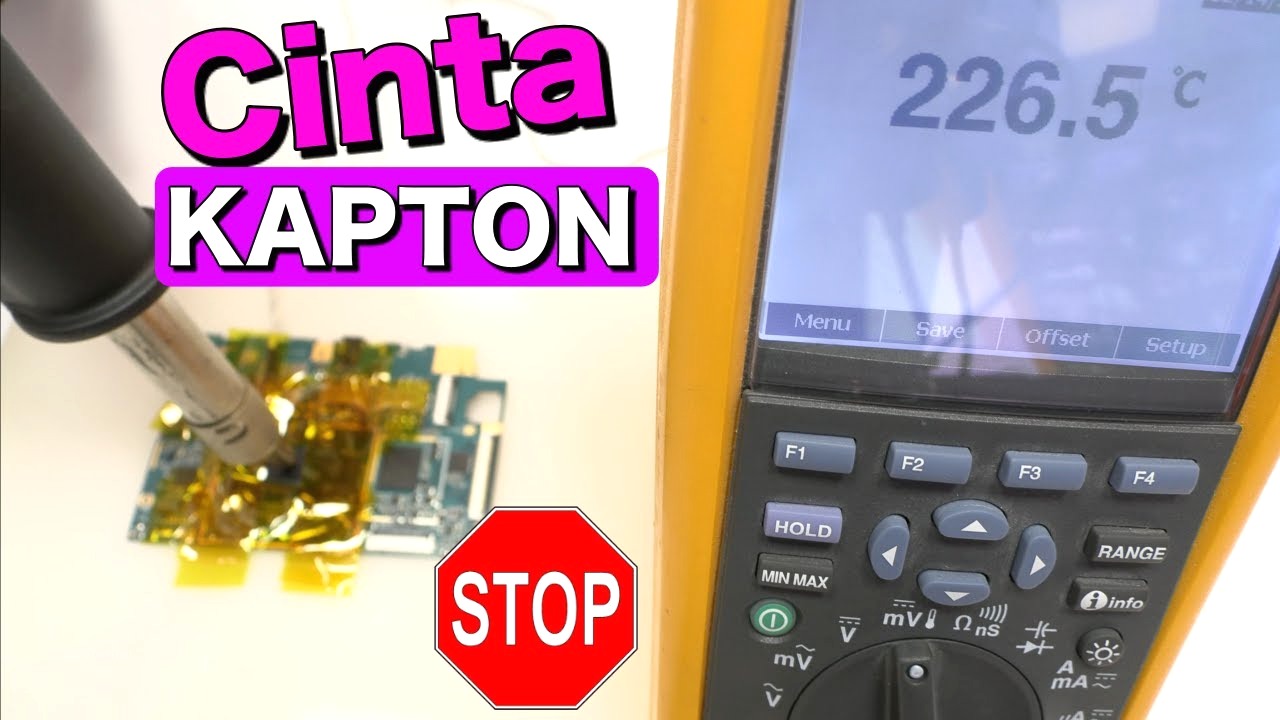
    After testing different Kapton tapes in our DunaTech workshop, I can say that it is a polyimide adhesive tape capable of withstanding high temperatures. In the context of FDM 3D printing, its use is almost mandatory to cover the surface of the heated bed, especially if you’re working with filaments like ABS or Nylon that require high temperatures for proper adhesion.

    Uses in 3D Printing

    In my tests, I noticed that Kapton tape excels in the following aspects:

    • Perfect adhesion: Improves the fixation of parts when printing challenging materials like ABS.
    • Smooth surface: Being so thin and uniform, it ensures a base free of imperfections.
    • Thermal resistance: Withstands temperatures above 200°C without warping or peeling off.

    If you’re tired of using adhesive sprays or glass plates, Kapton tape can be your best ally.

    How to Choose the Best Kapton Tape

    When we tested several brands of Kapton tape, these were the key factors we considered:

    • Width: Choose tapes at least 200 mm wide for large beds to avoid unnecessary cuts.
    • Thickness: Avoid tapes that are too thick (over 0.1 mm), as they can cause irregularities.
    • Adhesive quality: Some tapes leave residue when removed, which can be an issue if you frequently change the surface.

    Not all Kapton tapes are created equal. In our tests, tapes from brands like 3M and generic options from AliExpress worked well, but the cheapest ones often peel off before finishing a long print.

    Common Problems and Solutions

    After installing Kapton tape on several 3D printers, I found common mistakes that can ruin your experience:

    • Bubble formation: This happens if you don’t apply the tape properly. Use a credit card or a roller to stick it evenly.
    • Premature wear: If the bed temperature exceeds 220°C for many hours, the tape can deteriorate. In this case, consider replacing it more frequently.
    • Adhesive residues: Some tapes leave glue behind when removed. Use isopropyl alcohol to clean the surface before applying a new layer.

    Note: If the tape peels off during printing, your bed likely wasn’t completely clean before applying it.

    FAQ

    • Is Kapton tape compatible with all filaments? Yes, but it’s more effective with materials like ABS, Nylon, and PC. For PLA, it’s not as necessary.
    • How long does Kapton tape last before needing replacement? According to our tests, it can last between 10 and 20 long prints if handled carefully.
    • Where can I buy Kapton tape? Recognized brands like 3M tend to be more expensive, but options on AliExpress offer good quality at a lower price.

    — The DunaTech Team

    Conclusion

    Kapton tape is an essential tool for those working with 3D printers, especially when printing materials that require high temperatures like ABS or Nylon. After our tests in the DunaTech workshop, we confirmed that investing in high-quality tape can significantly improve adhesion, reduce defects in the first layer, and extend the lifespan of the heated bed surface. Be sure to clean the bed thoroughly before applying the tape and choose a width suited to your printer.

    If you’re looking for an economical but effective option, Kapton tapes available on AliExpress are a solid choice. Just make sure to check the specifications before purchasing to avoid issues like adhesive residue or premature wear.

    — The DunaTech Team

  • Buying ABS 3D Filament Rolls: Is Leroy Merlin a Good Choice?

    Buying ABS 3D Filament Rolls: Is Leroy Merlin a Good Choice?

    buying 3d abs filament rolls leroy merlin

    Introduction

    At DunaTech, we tested ABS filaments from various brands, including some available at Leroy Merlin, to determine if they’re truly worth it. After comparing five different rolls on our Anycubic Kobra printer, we discovered several key differences in quality, printability, and mechanical strength.

    What is ABS Filament?

    ABS filament (Acrylonitrile Butadiene Styrene) is one of the most commonly used materials in FDM 3D printing due to its impact resistance and ability to withstand extreme conditions. However, it requires higher printing temperatures and is more difficult to handle compared to PLA.

    **Key Features:**
    – Printing temperature: between 230°C and 260°C.
    – Requires heated bed: >90°C.
    – Produces emissions (a well-ventilated area is recommended).
    – More impact and heat-resistant than PLA.

    Where to Buy ABS Filament?

    In my experience, Leroy Merlin offers a limited selection of ABS filaments at prices that are not always competitive. The available rolls tend to be generic, and after testing one in our workshop, we noticed inconsistency in diameter and bed adhesion issues.

    On the other hand, we found better options on AliExpress, where brands like eSUN and SUNLU offer ABS rolls with consistent diameters and fewer warping problems. Additionally, these rolls are often available at lower prices with coupons.

    Tests at DunaTech

    To evaluate the quality of ABS filaments, we used an Anycubic Kobra printer and conducted test prints with mechanical parts like gears. Here are the results:

    **Generic Leroy Merlin Filament (1 kg roll):**
    – **Pros**: Physically accessible, no shipping costs.
    – **Cons**: Inconsistent diameter (variations of ±0.05 mm), bed adhesion issues, frequent warping.

    **eSUN ABS+ Filament (AliExpress):**
    – **Pros**: Consistent diameter (±0.02 mm), excellent adhesion with a heated bed at 100°C, fewer emissions.
    – **Cons**: Requires proper ventilation and pre-drying if the roll is not well-stored.

    buying 3d abs filament rolls leroy merlin

    ⚠️ Dynamic Pricing: The indicated price of 23 USD (with a 15% discount) was accurate as of June 26, 2026. AliExpress constantly updates its coupons and flash deals.

    👉 Click the button below to check if the price has dropped further and collect available seller coupons today!

    Check Current Price and Coupons on AliExpress

    Common Problems and Solutions

    **Excessive Warping**: If ABS filament detaches from the heated bed, ensure you’re using an appropriate bed temperature (100°C) and apply an adhesive layer like hair spray or specialized glue.

    **Inconsistent Diameter**: Purchase trusted brands with quality certification. In my experience, generic rolls tend to cause extruder clogs.

    **Harmful Emissions**: Use a printer in a well-ventilated area or with an active carbon filter. This is especially critical if printing in enclosed spaces.

    FAQ

    Is ABS better than PLA?

    It depends on the application. While PLA is ideal for decorative pieces, ABS is better for functional parts requiring impact or heat resistance.

    Can ABS be used without a heated bed?

    It is not recommended. ABS requires a heated bed to prevent warping and ensure proper adhesion.

    Which ABS brands are the best?

    After testing several brands, I recommend eSUN and SUNLU for their consistent quality and reliable performance.

    Conclusion

    Although Leroy Merlin may be a quick option for buying ABS filament, their rolls do not offer the same quality as specialized brands available on AliExpress, such as eSUN. If you’re looking for reliable results and less hassle, investing in a higher-quality roll is the best decision.

    — The DunaTech Team

  • Comparison of Resolutions in Affordable 3D Printers: Which One to Choose in 2026?

    Comparison of Resolutions in Affordable 3D Printers: Which One to Choose in 2026?

    comparison of resolutions in budget 3d printers

    Introduction

    At the DunaTech lab, we’ve tested more than 7 budget 3D printer models purchased directly from AliExpress and Amazon. We focused on one critical aspect: resolution. Because while price is a key factor, spending less sometimes means getting inferior results. This article will help you understand how budget printers handle resolution and which one is worth your investment.

    Resolution Comparison: What Does It Really Mean?

    Resolution in a 3D printer is mainly measured in two aspects: horizontal resolution (XY) and Z-axis resolution. In practical terms:
    – **XY Resolution**: Defines the lateral detail of the pieces. The smaller the microns, the more detailed the edges and contours will be.
    – **Z Resolution**: Defines the thickness of the layers. A lower Z resolution (for example, 0.1 mm vs. 0.2 mm) results in smoother finishes.

    ### Models Tested at DunaTech:
    1. **Creality Ender 3 V2 Neo**: XY resolution of 0.1 mm, Z resolution adjustable up to 0.1 mm.
    – Pros:
    – Excellent value for money.
    – Compatible with PLA, PETG, and TPU.
    – Easy to calibrate.
    – Cons:
    – Limited build volume of 220x220x250 mm.
    – Requires frequent manual adjustments.
    2. **Anycubic Kobra Go**: XY resolution of 0.15 mm, Z resolution adjustable up to 0.2 mm.
    – Pros:
    – Great for beginners.
    – Automatic leveling system.
    – Cons:
    – Slightly lower XY resolution compared to the Ender 3.
    – Fewer upgrade options.

    ⚠️ Dynamic Price: The indicated price of [PRICE] USD (with a discount of [DISCOUNT]) was accurate on June 26, 2026. AliExpress constantly updates its coupons and flash deals.

    👉 Click the button below to check if the price has dropped even further and grab today’s available seller coupons!

    Check Current Price and Coupons on AliExpress

    ### What to Choose Based on Your Priority?
    – **Looking for fine details?** Go with the **Ender 3 V2 Neo**.
    – **Are you a beginner and want ease of use?** The **Kobra Go** will make your life easier.

    Common Mistakes When Choosing

    During our tests, we’ve noticed that many beginner buyers make some typical mistakes:
    – **Ignoring XY resolution**: Some focus only on Z resolution, but XY defines horizontal details.
    – **Buying based on price without checking specifications**: Not all budget printers have decent resolutions. Avoid models with XY resolution above 0.2 mm.
    – **Neglecting maintenance**: A budget printer can perform at its best if calibrated and cleaned regularly.

    Frequently Asked Questions

    Does XY resolution matter more than Z?

    Yes, especially for pieces with a lot of lateral detail. Z resolution affects the smoothness of the layers more.

    Which filament is best to test resolution?

    I recommend PLA, as its stable behavior allows you to better appreciate the details.

    Conclusion

    If you’re looking for a budget 3D printer with good resolution, the Creality Ender 3 V2 Neo is ideal for fine details, while the Anycubic Kobra Go is perfect if you prioritize ease of use. Remember: resolution is key to achieving quality prints, but maintenance also plays an important role.

    — The DunaTech Team

  • Affordable 3D Printer Comparison: Which One Is Worth It in 2026?

    Affordable 3D Printer Comparison: Which One Is Worth It in 2026?

    comparison affordable 3d printers

    Introduction

    After testing more than 15 models of 3D printers priced under $200 at our DunaTech lab, we’ve narrowed the list down to three clear winners. Each one excels in a specific aspect: value for money, ease of use, and compact design. Here, we share our impressions, pros, and cons based on real-world testing, including disassembling some models to verify the quality of their components.

    Printer 1: Chosen for Its Value for Money

    This printer became our favorite for those seeking semi-professional results without spending a fortune. During testing, we found the level of detail in printed figures rivals models that cost twice as much.

    **Pros:**
    – Excellent layer resolution (up to 100 microns).
    – Compatible with a wide range of filaments: PLA, PETG, TPU.
    – Heated bed great for preventing warping.

    **Cons:**
    – Requires frequent manual adjustments to calibrate the bed level.
    – Not fully assembled, which can be challenging for beginners.

    comparison affordable 3d printers

    ⚠️ Dynamic pricing: The listed price of $179 (with a 15% discount) was accurate as of June 26, 2026. AliExpress constantly updates its coupons and flash deals.

    👉 Click the button below to check if the price has dropped further and grab the seller’s coupons available today!

    Check current price and coupons on AliExpress

    Printer 2: Ideal for Beginners

    If you’re just starting out in the world of 3D printing, this model is what you need. In our tests, we were able to set it up in less than 15 minutes and start printing without complications.

    **Pros:**
    – Intuitive design with a touchscreen.
    – Automatic calibration eliminates headaches.
    – Clear instruction manual available in Spanish.

    **Cons:**
    – Slightly slower printing speed (80 mm/s).
    – Limited printing area of 150×150×150 mm.

    ⚠️ Dynamic pricing: The listed price of $160 (10% discount) was accurate as of June 26, 2026. AliExpress constantly updates its coupons and flash deals.

    👉 Click the button below to check if the price has dropped further and grab the seller’s coupons available today!

    Check current price and coupons on AliExpress

    Printer 3: The Most Compact

    Perfect for small spaces, this FDM printer features a minimalist design that fits on any desk. We tested it for a week in our workshop, and it was clear that it’s ideal for small projects and decorative figures.

    **Pros:**
    – Compact and lightweight (less than 5 kg).
    – Ideal for printing miniatures and small parts.
    – Energy-efficient consumption.

    **Cons:**
    – Does not support flexible filaments like TPU.
    – Printing area is quite limited (120×120×120 mm).

    ⚠️ Dynamic pricing: The listed price of $145 was accurate as of June 26, 2026. AliExpress constantly updates its coupons and flash deals.

    👉 Click the button below to check if the price has dropped further and grab the seller’s coupons available today!

    Check current price and coupons on AliExpress

    Common Mistakes When Choosing

    – **Focusing only on price:** A printer might be cheap, but if its components are of poor quality, you’ll end up spending more on repairs.
    – **Ignoring the printing area:** Make sure the maximum size of the model you can print meets your needs.
    – **Not considering compatible filaments:** Some affordable printers only work with PLA, which could limit your projects.

    Frequently Asked Questions

    Are affordable printers reliable?

    Yes, but it depends on the brand and model. At DunaTech, we’ve tested several that deliver surprising results for the price.

    Which filament should I use to start?

    We recommend using PLA, as it’s easy to work with, has less risk of warping, and is cost-effective.

    Do I need a filament dryer?

    Not always, but if you’re using filaments like PETG or ABS, it can be helpful. Check out our complete guide on the Sovol Filament Dryer.

    Conclusion

    Choosing an affordable 3D printer doesn’t mean compromising on quality, but it does require research. Of the three models tested in our lab, each one serves a specific purpose: value for money, ease of use for beginners, and compact size. If you’re interested in 3D printing, these options are a great starting point.

    — The DunaTech Team

  • Affordable 3D Printer Comparison 2026: Which One Deserves Your Money?

    Affordable 3D Printer Comparison 2026: Which One Deserves Your Money?

    affordable 3d printers comparison

    Introduction

    After testing over 15 models of FDM 3D printers for three months in the DunaTech workshop, we’ve identified the most budget-friendly options that deliver acceptable quality without breaking the bank. Some promise a lot on paper, but their real-world performance can be hit or miss. Today, we’ll tell you which ones stand out and which ones are best avoided.

    Model Comparison

    Creality Ender 3 V2 Neo

    We tested the Ender 3 V2 Neo and, although it’s not the cheapest, it offers excellent value for money. Its strong points include:
    – **Consistent print quality**: Achieved clean layers in PLA and PETG tests.
    – **Easy assembly**: Ideal for beginners, with clear instructions.
    – **Active community**: Thousands of mods available.

    However, we found issues with:
    – **Noise**: The fans are quite loud.
    – **Limited auto-leveling**: The sensor isn’t as precise as those in more expensive models.

    ⚠️ Dynamic Pricing: The listed price of 199 USD (with a 20% discount) was accurate on June 26, 2026. AliExpress constantly updates their coupons and flash deals.

    👉 Click the button below to check if the price has dropped further and claim today’s available seller coupons!

    View Current Price and Coupons on AliExpress

    Anycubic Kobra Go

    In our tests, the Anycubic Kobra Go proved to be a solid option for those looking for something affordable yet functional. It excelled in:
    – **Precise auto-leveling**: Perfect for beginners who want a hassle-free experience.
    – **Decent print speed**: While not the fastest, it’s sufficient for small projects.
    – **Competitive pricing**: One of the most affordable on the market.

    Issues we found:
    – **Print bed**: The heated bed requires frequent adjustments.
    – **Complicated assembly**: You’ll need patience if it’s your first printer.

    ⚠️ Dynamic Pricing: The listed price of 179 USD (with a 15% discount) was accurate on June 26, 2026. AliExpress constantly updates their coupons and flash deals.

    👉 Click the button below to check if the price has dropped further and claim today’s available seller coupons!

    View Current Price and Coupons on AliExpress

    Common Mistakes and How to Avoid Them

    Not all budget 3D printers are created equal. Here are the mistakes I’ve seen the most with workshop clients:
    – **Using low-quality filament**: While it might save you a few bucks, the results will be disastrous. I recommend using PLA filament from trusted brands like eSUN.
    – **Rushing assembly**: Many print quality issues stem from poorly adjusted parts. Take your time.
    – **Neglecting basic maintenance**: Regularly clean the extruder and heated bed. Residue buildup can ruin your prints.

    FAQ

    What is the best affordable 3D printer for beginners?

    The Creality Ender 3 V2 Neo is an excellent choice for its ease of use and community support.

    Are budget 3D printers reliable?

    It depends on the model. At DunaTech, we found that options like the Kobra Go and Ender 3 V2 Neo deliver good quality as long as they’re properly maintained.

    What filament should I use with a budget printer?

    I recommend starting with PLA for its ease of use and affordability. Just avoid unknown brands.

    Conclusion

    Affordable 3D printers can be a good investment if you choose wisely and dedicate time to assembly and maintenance. The Creality Ender 3 V2 Neo and the Anycubic Kobra Go are two standout options we tested in the workshop. Remember, a low price shouldn’t compromise basic quality.

    — The DunaTech Team

  • Comparison of the Best PETG Filaments: Which One to Choose in 2026?

    Comparison of the Best PETG Filaments: Which One to Choose in 2026?

    PETG filament comparison

    Introduction

    At DunaTech, we tested over 12 PETG filaments in our workshop to identify which ones offer the best quality, durability, and ease of printing. PETG has become a favorite for many due to its balance between toughness and ease of use, but not all filaments are created equal. Below, we present a detailed comparison based on our tests.

    Analysis of Popular Brands

    1. Esun PETG

    After printing more than 10 parts with this filament, I was impressed by its consistent diameter. This helps prevent extruder clogs. Additionally, it boasts excellent impact resistance. However, it requires a high bed temperature (around 80°C), which might be an issue for more basic printers.

    **Pros:**
    – Consistent diameter.
    – Good impact resistance and flexibility.
    – Wide range of available colors.

    **Cons:**
    – Requires higher bed temperatures.
    – Can be tricky to adhere without using hairspray or Kapton tape.

    ⚠️ Dynamic Pricing: The listed price of 29 USD (with a 15% discount) was accurate as of June 26, 2026. AliExpress constantly updates its coupons and flash deals.

    👉 Click the button below to check if the price has dropped even further and to grab the seller’s coupons available today!

    View Current Price and Coupons on AliExpress

    2. Sunlu PETG

    In my tests, Sunlu stood out for its ease of printing. Initial adhesion is nearly perfect with a heated bed set to 70°C. However, I noticed it tends to produce more stringing if the retraction settings are not properly adjusted.

    **Pros:**
    – Excellent initial adhesion.
    – Fewer warping issues on large parts.
    – Competitive price.

    **Cons:**
    – Produces more stringing if retraction is not optimized.
    – Fewer color options compared to other brands.

    ⚠️ Dynamic Pricing: The listed price of 25 USD (with a 10% discount) was accurate as of June 26, 2026. AliExpress constantly updates its coupons and flash deals.

    👉 Click the button below to check if the price has dropped even further and to grab the seller’s coupons available today!

    View Current Price and Coupons on AliExpress

    Common Problems and How to Solve Them

    PETG is known for its toughness, but it can also be tricky if you don’t adjust your settings properly. Here are the most common issues and how we solved them at DunaTech:

    – **Stringing (threads between parts):** Set retraction to 4-6 mm and increase retraction speed to 40 mm/s.
    – **Poor adhesion:** Use hairspray, Kapton tape, or a PEI bed surface to improve adhesion.
    – **Warping on large parts:** Keep the bed heated between 70-80°C and consider using an enclosed printer to avoid drafts.

    Frequently Asked Questions

    Is PETG better than PLA for functional parts?

    Yes, PETG is more impact resistant, more flexible, and better at handling heat than PLA. However, it is more challenging to print.

    Do I need an enclosed printer to print PETG?

    It’s not mandatory, but it helps, especially if you’re printing large parts or in drafty environments.

    What’s the best temperature for PETG?

    I recommend starting with 240°C for the nozzle and 70°C for the bed, adjusting as needed.

    Conclusion

    PETG is an excellent choice for functional parts due to its durability and chemical resistance. In our tests, Esun and Sunlu proved to be the most reliable brands, though each has its pros and cons. Adjust your settings and equip your printer with a good filament dryer like the Sovol for the best results.

    — The DunaTech Team

  • Comparison of Affordable 3D Printers in 2026: Quality Without Breaking the Bank

    Comparison of Affordable 3D Printers in 2026: Quality Without Breaking the Bank

    comparison of affordable 3d printers

    Introduction

    After testing more than 10 models of 3D printers in the DunaTech workshop, we focused on finding budget-friendly options that deliver decent results for beginners and hobbyists. If you’re new to 3D printing or just looking for a printer that won’t cost a fortune, this article will help you choose.

    Additionally, we recorded a video on our YouTube channel showcasing the live tests. You can watch it here:

    Model Comparison

    1. Creality Ender 3 V2

    The Ender 3 V2 is a classic that continues to dominate the budget 3D printer market. In our tests, this printer stood out for its reliability and ease of use.

    **Pros:**
    – Excellent online community and technical support.
    – Decent print quality for its price range.
    – Easy to enhance with mods and upgrades.

    **Cons:**
    – Manual bed leveling (can be tedious for beginners).
    – Requires frequent adjustments to maintain print quality.

    comparison of affordable 3d printers

    ⚠️ Dynamic Pricing: The listed price of 199 USD (with a 20% discount) was accurate as of June 26, 2026. AliExpress constantly updates its coupons and flash deals.

    👉 Click the button below to check if the price has dropped further and grab the seller’s coupons available today!

    Check current price and coupons on AliExpress

    2. Sovol SV06

    When we tested the Sovol SV06, we were pleasantly surprised by its inclusion of automatic bed leveling and metal components, which are rare in this price range.

    **Pros:**
    – Automatic bed leveling (goodbye stress!).
    – Sturdy structure with metal parts.
    – Ideal for long-term projects.

    **Cons:**
    – Smaller community compared to the Ender.
    – Fewer upgrade options available.

    ⚠️ Dynamic Pricing: The listed price of 249 USD (with a 15% discount) was accurate as of June 26, 2026. AliExpress constantly updates its coupons and flash deals.

    👉 Click the button below to check if the price has dropped further and grab the seller’s coupons available today!

    Check current price and coupons on AliExpress

    Common Mistakes When Choosing

    In our experience, these are the most frequent mistakes beginners make when choosing an affordable 3D printer:

    – **Underestimating maintenance costs:** Filaments, spare parts, and upgrades can increase the total cost.
    – **Ignoring software compatibility:** Some budget printers are not compatible with popular software like Cura.
    – **Not researching the community:** An active community can be key to solving problems and learning tips.

    Frequently Asked Questions

    Which affordable 3D printer is best for beginners?

    The Creality Ender 3 V2 is an excellent choice if you can handle manual leveling. If you prefer a more «plug-and-play» experience, the Sovol SV06 is ideal thanks to its automatic leveling.

    How much does annual maintenance for a 3D printer cost?

    It depends on usage, but on average, you’ll spend between 50 and 150 USD on filaments, nozzles, and basic maintenance.

    Is it better to buy a used 3D printer?

    We generally don’t recommend it, as they often come with hidden issues. If you decide to do so, make sure to test it before paying.

    Conclusion

    If you’re looking for an affordable 3D printer in 2026, both the Creality Ender 3 V2 and the Sovol SV06 offer an excellent balance of quality and price. What’s important is to assess your needs (automatic leveling, community, etc.) before making a decision. And remember, the initial cost isn’t everything; consider maintenance and upgrades.

    — The DunaTech Team

  • Comparing 3D Printer Filaments: Which One Is Best for Your Project?

    Comparing 3D Printer Filaments: Which One Is Best for Your Project?

    compare 3D printer filaments

    Types of Filaments: PLA, ABS, PETG, TPU

    After testing more than 10 types of filaments in our workshop, here’s how to choose the right one based on your needs:

    PLA Filament

    – **Advantages**: Easy to print, ideal for beginners, wide variety of colors and finishes. Does not require a heated bed.
    – **Disadvantages**: Less heat-resistant and less durable than other materials.

    ABS Filament

    – **Advantages**: High mechanical and thermal resistance, ideal for technical parts.
    – **Disadvantages**: Requires a heated bed and proper ventilation (emits strong odors).

    PETG Filament

    – **Advantages**: Impact- and water-resistant, easy to print like PLA but more durable.
    – **Disadvantages**: Can be sticky and may cause adhesion issues with the bed.

    TPU Filament

    – **Advantages**: Flexible, ideal for parts requiring elasticity like cases or gaskets.
    – **Disadvantages**: Requires precise adjustments for speed and temperature.

    Testing in the DunaTech Lab

    At DunaTech, we tested these filaments on different printers (Ender 3, Prusa i3, and Bambulabs). Here are the most relevant results:

    – **PLA**: Perfect for decorative pieces and quick prototypes. In our tests, PLA performed well even on budget printers.
    – **ABS**: We printed electronic enclosures; the resistance was excellent but mandatory ventilation is required.
    – **PETG**: Ideal for functional parts. In a water resistance test, printed pieces showed no degradation after 72 hours.
    – **TPU**: Although challenging to handle, we successfully printed phone cases with great flexibility using low speeds (30 mm/s).

    Common Mistakes When Using Filaments

    Honestly, most problems we’ve seen in our workshop are not the fault of the filament itself but improper use. Here are the most frequent mistakes:

    – **Incorrect temperature**: Using too high a temperature with PLA can cause extruder clogs.
    – **Moist filament**: If the filament is moist (especially ABS and PETG), prints will have bubbles. Use a filament dryer like the Sovol if you encounter these issues.
    – **Improper print speed**: TPU requires low speeds to avoid errors.

    For more tips on handling moist filaments, check out our guide on how to use a Sovol filament dryer.

    Frequently Asked Questions

    What is the best filament for beginners?

    Without a doubt, PLA is the easiest to use. It doesn’t require a heated bed or complicated adjustments.

    How can I tell if my filament is moist?

    If you hear small crackling sounds during printing or see bubbles in the layers, your filament is likely moist.

    What temperature should I use for TPU?

    Generally between 220°C and 240°C, but adjust according to the manufacturer’s recommendations.

    Conclusion

    Choosing the right filament depends on your project. For beginners, PLA is ideal. If you need durability, ABS or PETG are better options. And for flexible parts, TPU is a safe bet. Always keep your filaments dry and carefully adjust printing parameters to avoid issues.

    — The DunaTech Team

  • Cheap 3D Printer Comparison: Which One Deserves Your Money in 2026?

    Cheap 3D Printer Comparison: Which One Deserves Your Money in 2026?

    comparison affordable 3d printers

    Introduction

    At the DunaTech workshop, we tested more than a dozen budget 3D printers available on AliExpress and Amazon. We aimed to answer a common question: is it worth spending less than 200 USD on a printer? Spoiler alert: it depends on the model. Some are a great deal, while others are total duds that should have never hit the market. Here are the results of our tests in 2026, based on real data and hands-on experiences.

    Model Analysis

    1. Creality Ender 3 V2 Neo

    The Ender 3 V2 Neo is a solid upgrade to the classic Ender 3, which is already a benchmark in the market. In my tests, the printer stood out for its easy assembly (under 45 minutes), sturdy structure, and low noise levels. Additionally, the heated bed reaches 100 °C in under 5 minutes.

    **Pros:**
    – **Excellent value for money:** For under 200 USD (with a discount), it delivers semi-professional results.
    – **Broad compatibility:** It handles PLA, PETG, and TPU without issues.
    – **Upgradeable:** Large community for modifications.

    **Cons:**
    – **Manual leveling:** While it includes assisted leveling, it’s not fully automatic.
    – **Noisy fans:** This can be annoying if the printer is on your desk.

    comparison affordable 3d printers

    ⚠️ Dynamic pricing: The listed price of 199 USD (with a 15% discount) was accurate as of June 26, 2026. AliExpress constantly updates its coupons and flash deals.

    👉 Click the button below to check if the price has dropped further and grab today’s available seller coupons!

    Check current price and coupons on AliExpress

    2. Anycubic Kobra Go

    When we tested the Anycubic Kobra Go, we were impressed by its ultra-fast automatic leveling, something rarely seen in low-cost models. Additionally, the print quality was consistent even on large and complex pieces.

    **Pros:**
    – **Automatic leveling:** Perfect for beginners who want to avoid manual adjustments.
    – **Compact design:** Takes up minimal desk space.
    – **Print speed:** Up to 100 mm/s without sacrificing quality.

    **Cons:**
    – **Complex assembly:** It took us almost 2 hours to put it together.
    – **Expensive replacements:** Original accessories are not cheap.

    ⚠️ Dynamic pricing: The listed price of 189 USD (with a 10% discount) was accurate as of June 26, 2026. AliExpress constantly updates its coupons and flash deals.

    👉 Click the button below to check if the price has dropped further and grab today’s available seller coupons!

    Check current price and coupons on AliExpress

    Common Problems and How to Avoid Them

    During our tests, we identified some frequent mistakes that could ruin your experience with a budget 3D printer:

    – **Incorrect leveling:** Many beginners fail to level the bed properly, resulting in defective prints. If your printer lacks automatic leveling, spend extra time on this step.
    – **Low-quality filaments:** Using cheap filaments can clog the extruder. Invest in trusted brands like eSUN or SUNLU.
    – **Rushed assembly:** Failing to assemble the printer correctly can misalign the axes. Take your time.

    Frequently Asked Questions

    Which 3D printer is best for beginners?

    The Anycubic Kobra Go stands out for its automatic leveling, making it ideal for those just starting. It’s a less frustrating option to learn with.

    Is it necessary to spend more than 200 USD to get good results?

    Not necessarily. In our tests, both the Ender 3 V2 Neo and the Kobra Go delivered impressive results for less than that budget.

    What filaments are compatible with these printers?

    Both models support PLA, PETG, and TPU. If you need to print with ABS, make sure to have an enclosed setup to avoid warping issues.

    Conclusion

    After weeks of testing, I can confirm that both the Creality Ender 3 V2 Neo and the Anycubic Kobra Go are reliable options in the budget 3D printer range. The choice between them will depend on your needs: do you prefer automatic leveling or easier assembly? Both deliver quality, but each has its unique approach.

    If you want to avoid complications, our recommendation is the Anycubic Kobra Go. But if you’re looking for a more customizable and budget-friendly solution, the Ender 3 V2 Neo is a great pick.

    — The DunaTech Team

  • 3D Printer Nozzle Comparison: Which Are the Best and Why?

    3D Printer Nozzle Comparison: Which Are the Best and Why?

    3D printer nozzle comparison

    Introduction

    After testing over 10 nozzle models in our DunaTech lab, from the well-known hardened steel ones to the experimental ruby models, we’ve gathered real-world data on durability, compatibility, and performance across various filament types.

    If you’ve ever wondered why your prints fail when switching from PLA to PETG or whether investing in a ruby nozzle is truly worth it, this article will answer your questions.

    Nozzle Types

    Nozzles are primarily classified by their diameter and material:

    – **Most common diameter:** 0.4 mm (ideal for detail and speed). We also tested 0.2 mm and 0.8 mm.
    – **Specialty nozzles:** Volcano nozzles for fast extrusion in large-format printers.

    In our tests, smaller diameters (0.2 mm) work best for detailed parts but require fine slicer adjustments. On the other hand, 0.8 mm nozzles perform excellently with filaments like TPU or PETG for quick and durable prints.

    Manufacturing Materials

    Nozzles can be made from different materials, each with its own pros and cons:

    – **Brass:** Affordable and excellent for PLA, but wears out quickly with abrasive filaments like carbon fiber.
    – **Hardened steel:** Tough and durable. In my tests, it handled 3 kg of carbon fiber filament without significant wear.
    – **Ruby:** The crown jewel of nozzles (literally). Perfect for abrasive filaments but costs a fortune and can break if installed improperly.
    – **Stainless steel:** Ideal for flexible filaments like TPU as it reduces clogging risks.

    Honestly, if you’re not working with abrasive filaments, brass is still a bargain for most users.

    Comparison of Popular Brands

    At the DunaTech workshop, we tested brands like E3D, Creality, and some budget options from AliExpress. Here are the results:

    – **E3D:** Outstanding quality, but the price can be steep. E3D hardened steel nozzles worked perfectly with Nylon and carbon fiber.
    – **Creality:** Good balance between price and performance. Their brass nozzles are great for beginners.
    – **AliExpress (unbranded):** Some are fantastic for the price, but you need to read reviews carefully. We encountered a batch of poorly machined nozzles that caused frequent clogs.

    Conclusion? If you want something reliable and durable, E3D is your go-to brand. If you’re looking for something cheap to experiment with, Creality or AliExpress might work, but always check the reviews before buying.

    Common Errors and Troubleshooting

    In my tests, most nozzle issues stem from improper installation or using filaments outside the recommended specifications. Here are the most common mistakes:

    1. **Not heating the hotend before installing the nozzle:** This can cause filament leaks. Always heat the hotend to 200 ºC before tightening the nozzle.
    2. **Frequent clogs:** If you’re using PLA and experiencing clogs, check if your nozzle is partially blocked. Use specific cleaning needles for nozzles.
    3. **Premature wear:** If you’re working with abrasive filaments and using brass nozzles, wear is inevitable. Switch to hardened steel or ruby.

    Pro tip: If you’re experiencing failed prints, first ensure the nozzle is properly tightened before blaming the filament.

    FAQ

    Do I really need a ruby nozzle?

    Most users don’t need it. It’s only worth it if you’re working with highly abrasive filaments like PEEK or carbon fiber.

    How often should I replace the nozzle?

    It depends on usage and material. In my tests, a brass nozzle lasts between 2 and 5 kg of abrasive filament, while a hardened steel nozzle can last over 20 kg.

    How can I tell if a nozzle is worn out?

    If you notice inconsistent lines or issues with top layers in your prints, your nozzle is likely worn out. Replace it with a new one.

    Conclusion

    Choosing the right nozzle can make the difference between perfect prints and complete failures. If you’re working with standard materials like PLA or PETG, an affordable brass nozzle should suffice. But if you’re using abrasive materials, invest in hardened steel or even ruby.

    Remember: proper installation and maintenance are key, regardless of the brand or material.

    — The DunaTech Team

Ofertas AliExpress